
Unturned Cheat
Full-feature Unturned cheat: player + item + zombie ESP, aimbot, silent aim.
About Unturned
Full-featured cheat for Unturned. Player ESP (box, skeleton, health, distance, weapon), item ESP (weapons, medkits, ammo), aimbot with FOV and prediction, silent aim, no-recoil, fly, and more. Undetected since launch. BattlEye + custom AC support.
What's included
6 core systems · built for fast setupPlayer ESP & Chams
Boxes, labels, health, skeletons, multiplayer badges, tracers, and player or zombie chams.
Aimbot & Crosshair
SendInput, Silent Aim, or Aimlock with prediction, smoothing, visibility, targeting, and reticle controls.
Weapon Controls
Recoil, spread, fire delay, range, trajectory, damage falloff, and ADS movement controls.
Movement & Combat
Safe-mode visibility plus configurable movement, gravity, triggerbot, accuracy, sway, and sprint-fire controls.
World, Loot & Bases
Zombies, wildlife, vehicles, loot categories, traps, sentries, charges, beds, and claim flags.
Radar & Automation
Positionable radar, world effects, capture isolation, and configurable auto-consumable thresholds.
Complete feature list
18 categories · 148 controlsPlayer ESP Player boxes, labels, health, tracers, distances, and positioning controls. 24
- Enable ESP — Master toggle
- Box style — Select None, Filled, Outline, Corners, Corners + shadow, Rounded fill, or Rounded outline
- Dynamic box — Fit the box more tightly to the skeleton
- Box padding — Add extra pixels around the player
- Box fill — Apply a wash color inside the box
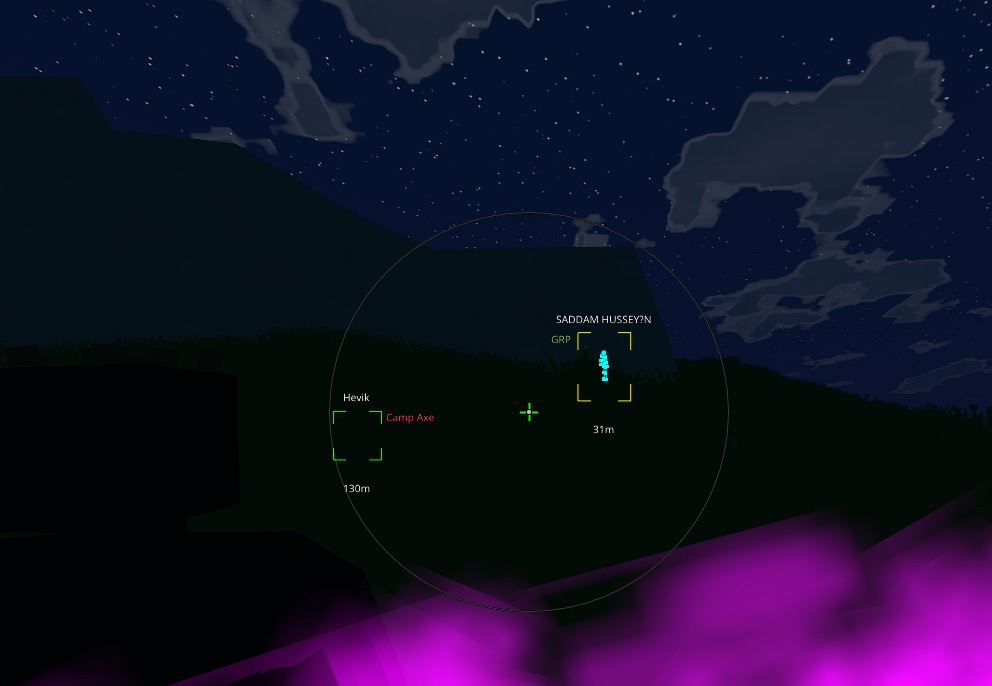
- Name — Display the player name
- Distance — Display meters to the target
- Weapon — Display the equipped weapon name
- Status info — Display ADMIN, GRP, and VOICE flags
- Health bar — Draw an HP bar around the box
- HP bar position — Place the HP bar at Bottom, Top, Left, or Right
- HP bar style — Choose a classic solid or gradient bar
- Name position — Place the name Above, Below, Left, or Right
- Distance position — Choose where the distance label is displayed
- Weapon position — Choose where the weapon label is displayed
- Status position — Choose where ADMIN, GRP, and VOICE badges are displayed
- Text spacing — Adjust line height for stacked labels
- Snap line — Draw a line from the selected origin to the target
- Snap origin — Use Center, Bottom, Top, Left, Right, or one of four corners
- Snap thickness — Adjust the snap-line width
- Eye tracer — Draw a ray along the target look direction
- Tracer distance — Adjust how far the eye ray extends
- Tracer thickness — Adjust the eye-ray line width
- Max distance — Set the Player ESP culling range
Skeleton Skeleton lines and distance-aware joint markers. 4
- Enable skeleton — Draw player skeleton lines
- Skeleton range — Set the skeleton culling distance
- Joint dots — Draw a small dot at each bone
- Dots range — Show joint dots only within the selected range
Chams Silhouette controls for player and zombie visibility. 3
- Enable chams — Master chams toggle
- Player chams — Display player silhouettes
- Zombie chams — Display zombie silhouettes
Multiplayer Badges Live multiplayer identity, group, voice, and latency indicators. 4
- Show ADMIN — Display the administrator badge
- Show GROUP — Display group affiliation
- Show VOICE — Highlight players who are speaking
- Show PING — Display player latency in milliseconds
Crosshair A configurable static center reticle. 5
- Enable crosshair — Display the static center reticle
- Outline — Add a black outline for contrast
- Length — Adjust reticle arm length in pixels
- Thickness — Adjust reticle line width
- Gap — Adjust the center gap in pixels
Aimbot Target selection, delivery method, prediction, smoothing, and hotkey controls. 19
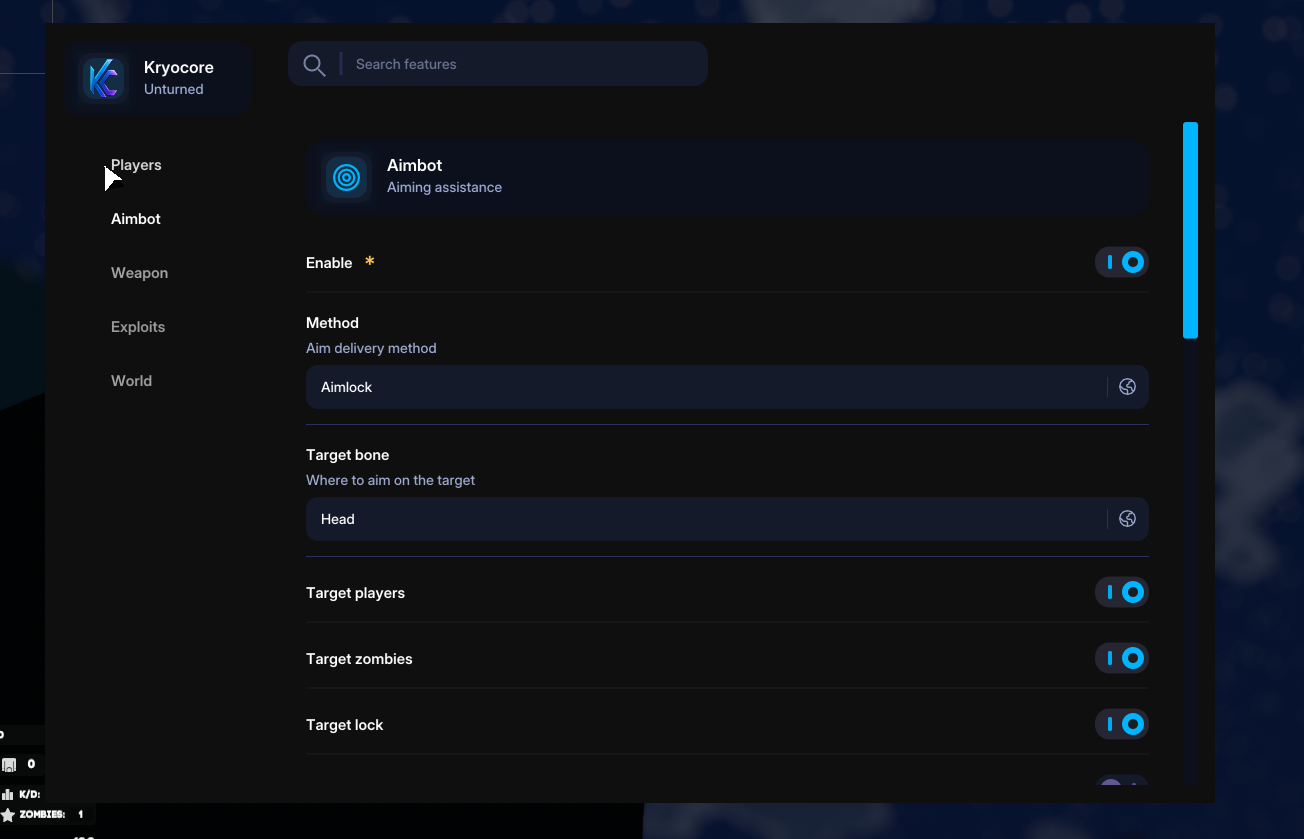
- Enable — Master aimbot toggle
- Method — Select SendInput, Silent Aim, or Aimlock
- Target bone — Aim at Head, Chest, Pelvis, or the nearest bone
- Target players — Allow player targets
- Target zombies — Allow zombie targets
- Target lock — Stay on the first acquired target
- Distance priority — Prefer closer targets
- FOV circle — Draw the targeting radius
- FOV size — Adjust the targeting radius in pixels
- Smoothing — Enable human-like aim movement
- Smooth speed — Adjust the interpolation rate
- Sensitivity — Match the configured in-game sensitivity
- Randomness — Add configurable micro-jitter variation
- Prediction — Lead moving targets
- Bullet drop — Compensate for projectile gravity
- Bullet speed — Set projectile velocity in meters per second
- Visibility — Target visible entities only
- Silent hold — Set how long the silent-aim redirect is held in milliseconds
- Aim hotkey — Choose the key held to aim
Stream-proof Capture-isolation behavior for supported recording methods. 1
- Stream-proof — Hide the overlay from supported OBS and screenshot capture paths
Weapon Weapon recoil, spread, timing, range, trajectory, and movement controls. 9
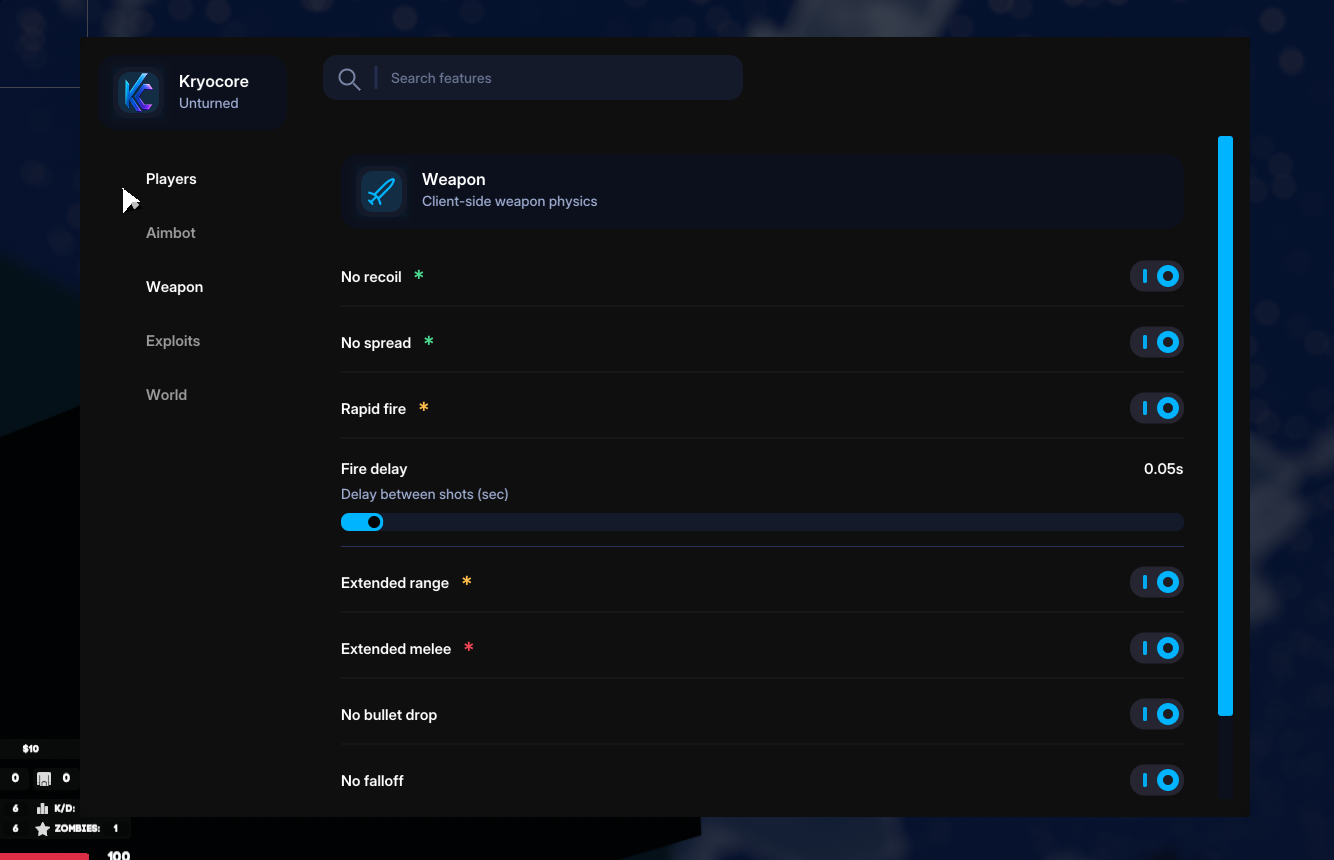
- No recoil — Remove recoil kick
- No spread — Keep projectiles aligned with the crosshair
- Rapid fire — Reduce the fire delay
- Fire delay — Set the delay between shots in seconds
- Extended range — Longer weapon range; the server may ignore this value
- Extended melee — Longer melee reach; the server may ignore this value
- No bullet drop — Use a straight projectile trajectory
- No falloff — Keep full configured damage at range
- Full ADS speed — Maintain movement speed while aiming
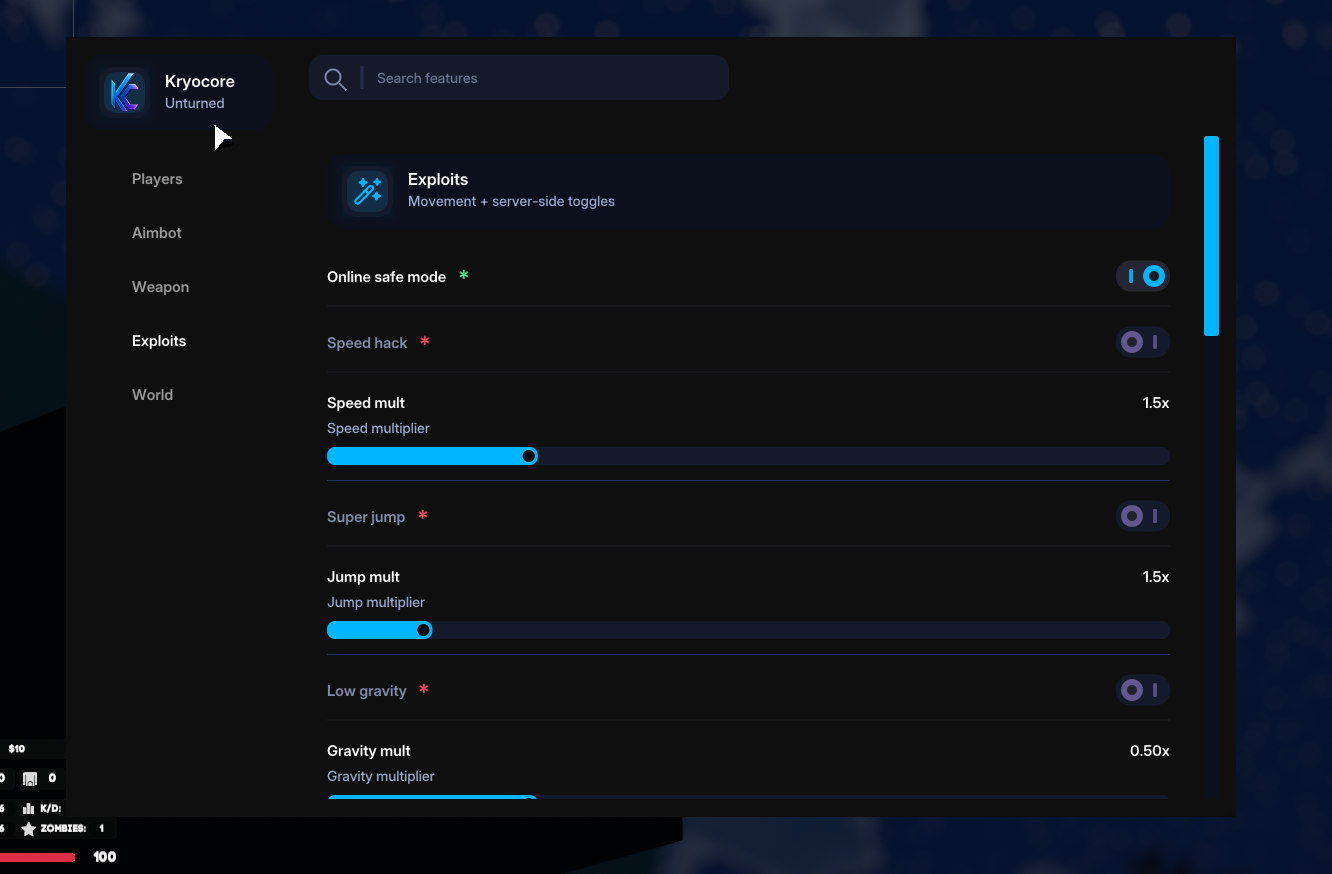
Exploits — Global Global visibility control for higher-risk settings. 1
- Online safe mode — Hide higher-risk toggles
Exploits — Movement Movement speed, jump, gravity, and launch-force controls. 7
- Speed hack — Enable the movement multiplier
- Speed mult — Adjust the speed multiplier
- Super jump — Enable jump-height boost
- Jump mult — Adjust the jump multiplier
- Low gravity — Enable reduced gravity
- Gravity mult — Adjust the gravity multiplier
- Launch power — Adjust the vertical boost force
Exploits — Combat Automatic firing, accuracy, sway, and sprint-fire controls. 6
- Triggerbot — Automatically fire when a target is acquired
- Trigger radius — Adjust the automatic-fire radius in pixels
- Trigger delay — Adjust the automatic-fire delay in milliseconds
- Perfect accuracy — Keep weapon spread removed
- No sway — Remove weapon sway
- Sprint stop trigger — Automatically fire as sprinting stops
Exploits — Utility Lighting, camera, map, survival, reload, fire-mode, and visual-state controls. 13
- Fullbright — Remove darkness
- Night vision — Apply a green night-vision tint
- Freecam — Detach the camera
- Camera zoom — Enable scope-like camera zoom
- Zoom factor — Adjust the field-of-view multiplier
- Unlock map — Reveal the full map
- Infinite stamina — Prevent stamina depletion
- Infinite oxygen — Prevent drowning from oxygen depletion
- Warmth hack — Prevent freezing from warmth loss
- Remove debuffs — Automatically clear supported negative effects
- No reload — Prevent local ammunition depletion
- Force auto — Force full-auto fire; this may kick on semi-only weapons
- Admin spoof — Visual-only administrator visibility
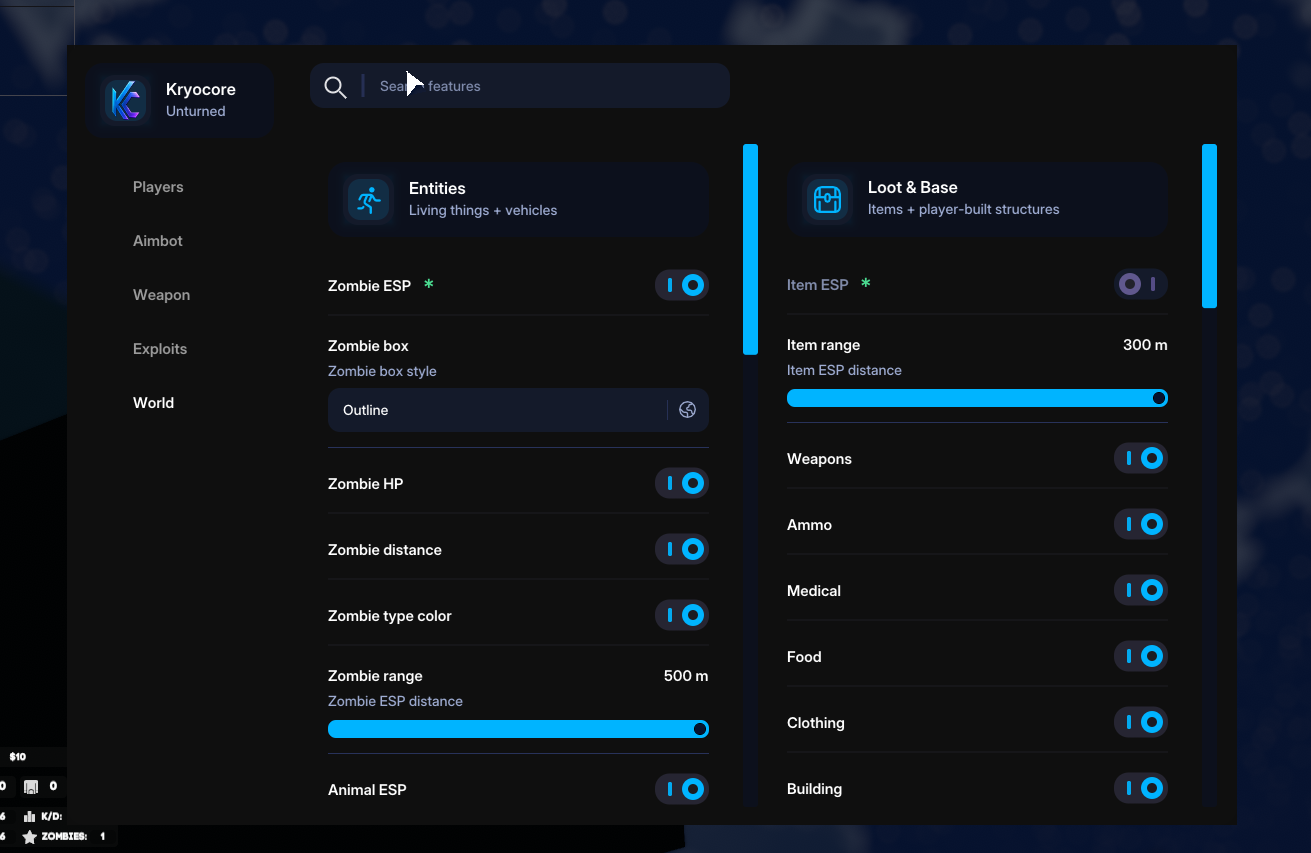
World — Entities Zombie, animal, and vehicle visualization with configurable distance and detail. 11
- Zombie ESP — Display zombies
- Zombie box — Select the zombie box style
- Zombie HP — Display zombie health
- Zombie distance — Display zombie distance in meters
- Zombie type color — Apply species-specific colors, including mega and boss types
- Zombie range — Set the Zombie ESP distance
- Animal ESP — Display wildlife
- Animal range — Set the Animal ESP distance
- Vehicle ESP — Display cars, boats, and other vehicles
- Vehicle info — Display fuel, health, and occupants
- Vehicle range — Set the Vehicle ESP distance
Radar A positionable minimap with configurable size, range, and opacity. 6
- Radar — Display the corner minimap
- Radar size — Adjust minimap size in pixels
- Radar range — Adjust the visible world range
- Radar alpha — Adjust background opacity
- Radar X — Adjust the minimap horizontal position
- Radar Y — Adjust the minimap vertical position
World FX Fog, time-of-day, and incoming-aim warning controls. 4
- No fog — Remove distance fog
- Fixed time — Lock the time of day
- Time target — Set the world cycle position, where about 720 represents noon
- Pre-fire warning — Pulse when another player aims at you
Loot ESP Ground-loot visibility with category filters and distance control. 10
- Item ESP — Display ground loot
- Item range — Set the Item ESP distance
- Weapons — Display weapon items
- Ammo — Display ammunition boxes
- Medical — Display medical items
- Food — Display food items
- Clothing — Display clothing items
- Building — Display building materials
- Tools — Display tool items
- Other — Display uncategorized items
Base Structures ESP Player-built structures, traps, sentries, explosives, beds, and claim flags. 10
- Barricade ESP — Display player-built structures
- Barricade range — Set the barricade display distance
- Trap ESP — Display mines and spikes
- Trap range — Set the trap display distance
- Sentry ESP — Display automatic turrets
- Sentry range — Set the sentry display distance
- C4 charge ESP — Display explosive charges
- Charge range — Set the C4 display distance
- Bed ESP — Display respawn beds
- Claim flag ESP — Display territory flags
Auto Consumables Threshold-based automatic use of healing, food, water, and condition items. 11
- Enable auto-use — Master automatic-consumable toggle
- Auto bandage — Use a bandage when hurt
- HP threshold — Use a bandage below the selected health value
- Auto morphine — Use morphine when a fracture is detected
- Auto splint — Use a splint when a fracture is detected
- Auto vaccine — Use a vaccine when infection is detected
- Virus threshold — Use a vaccine below the selected virus percentage
- Auto food — Eat when hunger passes the selected threshold
- Food threshold — Set the automatic-food percentage
- Auto water — Drink when thirst passes the selected threshold
- Water threshold — Set the automatic-water percentage
Screenshots
In-game overlay renders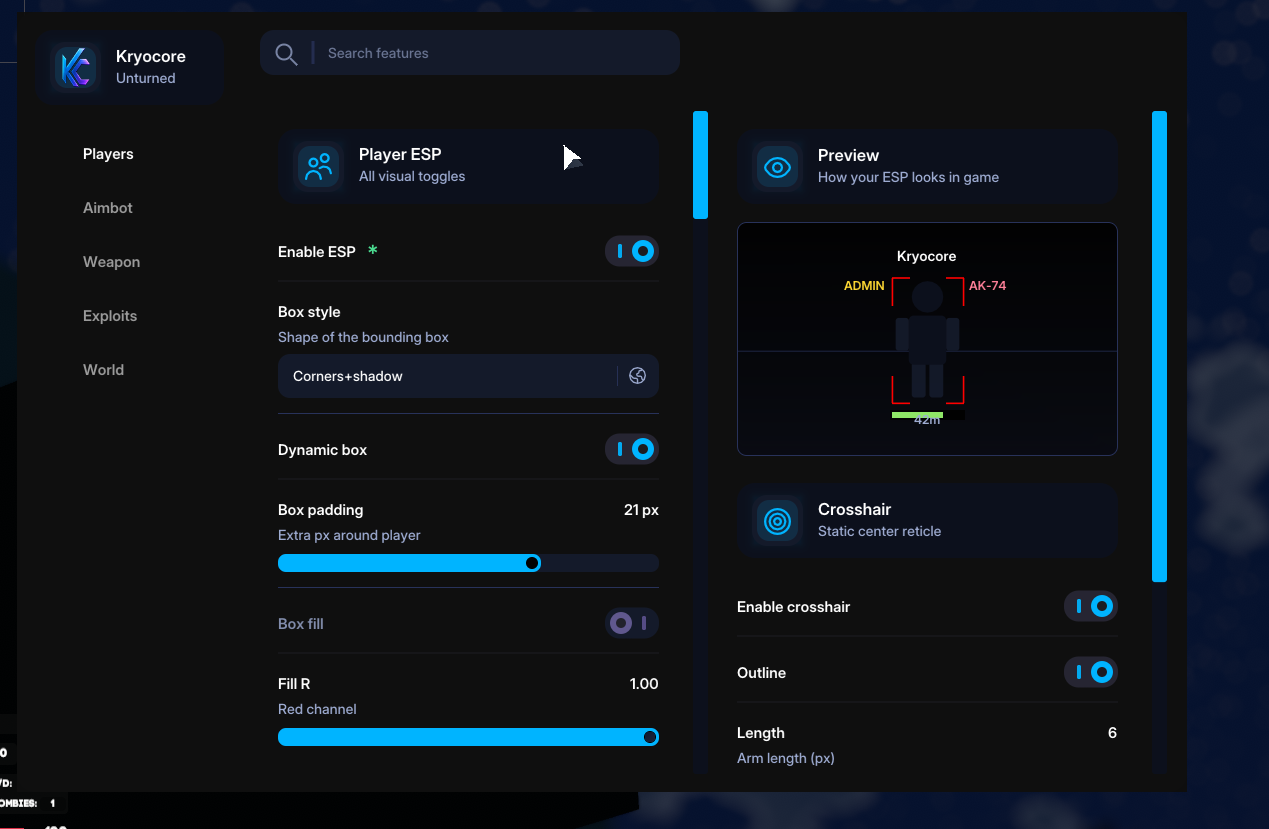
Available plans
Fast delivery · Secure hosted checkoutRecent updates
Last 3 releasesUnturned questions
3 product-specific answersThese answers apply specifically to this product. Requirements, activation, access issues, and general troubleshooting are available in the universal FAQ.
How do I confirm that my Unturned version is supported?
Can I hide friends from the on-screen player list?
Is the killfeed available?
Open the universal FAQ for requirements, activation, access messages, troubleshooting, and support guidance.